
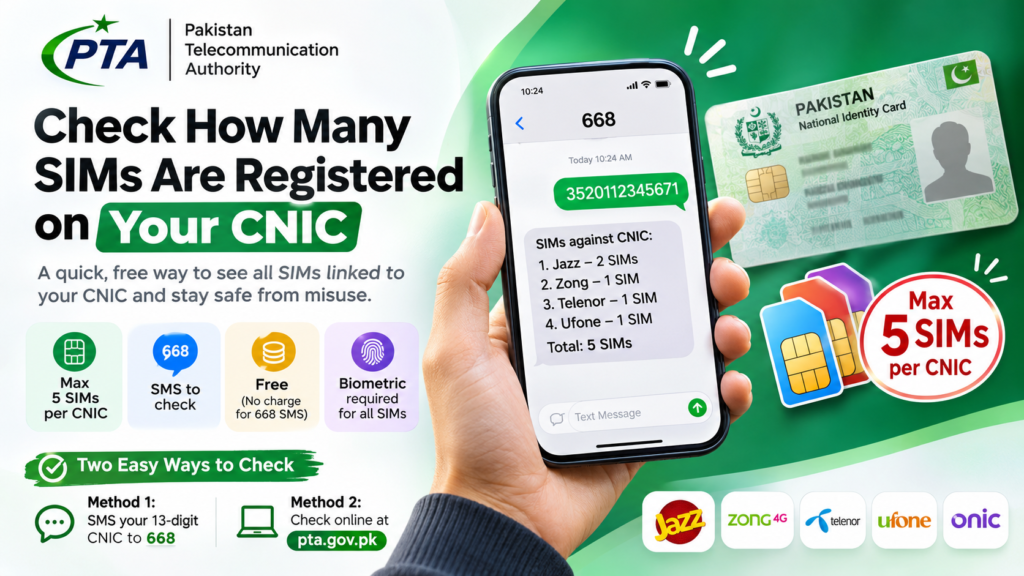
How to Check SIMs Registered on Your CNIC in Pakistan (2026)?

Do you know how many mobile SIMs are registered against your CNIC? Pakistan’s telecom regulator, the Pakistan Telecommunication Authority (PTA), provides two simple ways to check. Whether you are planning to buy a new SIM or simply want to protect your identity, checking your SIM registration record is a sensible precaution. It takes less than a minute.
How to Check SIMs Registered on Your CNIC
PTA offers two convenient ways to check how many SIMs are registered against your Computerised National Identity Card (CNIC). You can either send a text message or use the online SIM Information System.
Method 1: Check Through SMS (668)
This is the quickest option if you have access to a mobile phone. You do not need to visit a franchise or speak to a customer service representative.
Type your 13-digit CNIC number without spaces or hyphens and send it to 668.
PTA will send you a reply showing the number of SIMs registered against your CNIC, broken down by mobile operator.
Follow these simple steps:
Important: The 668 service may involve SMS charges. Check your mobile operator’s applicable messaging charges before using it.
Method 2: Check Online Through the PTA Portal
If you prefer using a computer or smartphone browser, you can check your registration record through PTA’s online SIM Information System.
Use the official portal to check the SIM registration count associated with your CNIC.
How to use the portal:
The online option is particularly convenient if you are checking from a desktop computer or do not have access to your usual Pakistani mobile number.
How Many SIMs Can Be Registered on One CNIC?
PTA’s SIM registration limit is an important consideration when purchasing a new mobile connection. The maximum permitted number is five SIMs per CNIC, across mobile operators combined.
This means your registrations with different networks count towards the applicable limit. Having connections with multiple operators does not give you a separate allowance for each network.
| Mobile Operator | Network | Counts Towards Limit |
|---|---|---|
| Jazz | Jazz | Yes |
| Zong | Zong 4G | Yes |
| Telenor | Telenor | Yes |
| Ufone | Ufone 4G | Yes |
| Onic | Onic | Check applicable PTA allocation |
If you have reached the applicable registration limit, you may need to have an existing connection deactivated before obtaining another one. Contact the relevant operator to confirm your registration status and the required procedure.
What to Do If You Find Unknown SIMs on Your CNIC
This is the most important reason to check your SIM registration record regularly. If the total number of registered SIMs is higher than the connections you actually use, investigate the discrepancy.
An unauthorised SIM registration could indicate identity misuse. Remember that the person whose CNIC is used to register a SIM remains responsible for its use.
Here is what you should do:
Do not assume that an unexpected SIM count is simply a database error. Ask the operator to investigate and formally document the complaint. Keep your complaint reference until the matter is resolved.
How Can Someone Misuse Your CNIC?
Your CNIC is an important identity document. Copies are sometimes requested during property transactions, vehicle purchases, employment registrations, hotel check-ins and other routine activities.
Although a photocopy alone should not be sufficient to activate a SIM under PTA’s biometric verification requirements, identity misuse and fraudulent registration attempts remain risks.
Take these precautions to protect your identity:
- Only provide your CNIC copy when there is a legitimate reason.
- Where accepted, write the purpose and date on photocopies before submitting them.
- Never allow an unknown person to use your fingerprint on a biometric device.
- Purchase SIMs through authorised operator franchises or service centres.
- Check your SIM registration record periodically.
- Never share your CNIC information or verification codes with suspicious callers or websites.
Frequently Asked Questions
Can I check SIMs registered on someone else’s CNIC?
PTA’s SIM Information System is intended for checking registrations associated with your own identity. You should not use another person’s CNIC without their permission. For family connections, the registered account holder should contact the relevant operator to manage their SIMs.
Does the 668 service show actual mobile numbers?
The 668 service provides the number of SIMs registered against your CNIC, broken down by operator. It is not a public facility for retrieving the complete mobile numbers or personal details of SIM owners. Contact the relevant operator if you need to investigate an unexpected registration.
Is checking SIMs through 668 free?
Not necessarily. PTA advises that charges may apply when sending your CNIC to 668. Your mobile operator’s applicable SMS charges may also vary.
Can someone register a SIM using my CNIC without my biometric verification?
PTA requires biometric verification for normal SIM activation. However, fraudulent registration or identity misuse can still occur. If you discover a SIM you did not authorise, immediately approach the concerned operator and request an investigation.
What should overseas Pakistanis do to check their SIM registrations?
Overseas Pakistanis can try the online PTA SIM Information System at cnic.sims.pk. Enter the relevant identity details and complete the verification requested by the portal. The availability of SMS verification depends on access to a Pakistani mobile connection.
What happens if I reach the maximum SIM registration limit?
You may need to deactivate an existing connection before a new SIM can be issued. Visit the relevant operator’s service centre with your original CNIC and ask them to check your current allocation. Recheck your registration count after the change has been processed.
How often should I check SIMs registered against my CNIC?
Checking every three to six months is a sensible precaution. You should also check after any incident where you suspect your identity documents or personal information may have been misused.
Check your SIM registration today.
Take a minute to make sure your mobile connections are
registered correctly and your CNIC is not being misused.
Information is provided as a public awareness guide. SIM registration limits, verification requirements and service charges are subject to PTA regulations and operator policies.